

Salesforce Configuration for a Holiday "Adopt a Family" Program
A human-centered Salesforce implementation that supported, rather than replaced, deep local knowledge—and laid the foundation for long-term growth.
All content used with permission of the client. All data is fictitious.
Table of Contents
Project Overview
Client:
- Human services organization
Role:
- Process Designer
- Salesforce Admin
- Business Analyst
Tools Used
- Salesforce
- Flow
- Screen Flows
- Jotform
- Mambo Merge
- Map Plotter
- Experience Cloud (Aura Site)
Impact
- Digitized a paper-based holiday gift program
- Improved visibility and matching efficiency
- Served a record-breaking 300 families and 600+ children
Client Context
The Adopt-a-Family program connects families in need with sponsors who provide Christmas gifts. While it appears simple – connecting sponsors with families – the program is operationally complex, involving eligibility checks, family interviews, nuanced sponsor matching, delivery logistics, volunteer coordination, and strict seasonal deadlines.
Before Salesforce, the program relied on paper applications for families, Google Forms for sponsors, spreadsheets, and informal workflows managed largely by one administrator. Visibility for other staff was limited, delegation to staff and volunteers was difficult, and the program carried significant continuity risk.
Engagement Objectives
- Replace fragile, manual processes with a centralized CRM and automated workflows
- Reduce reliance on institutional knowledge held by one individual
- Reduce staff stress and cognitive load by replacing manual tracking and uncertainty with real-time visibility
- Reduce repetitive manual processes to free up staff time
- Increase capacity without increasing staff burden
- Create a foundation that could evolve year over year
What I Built
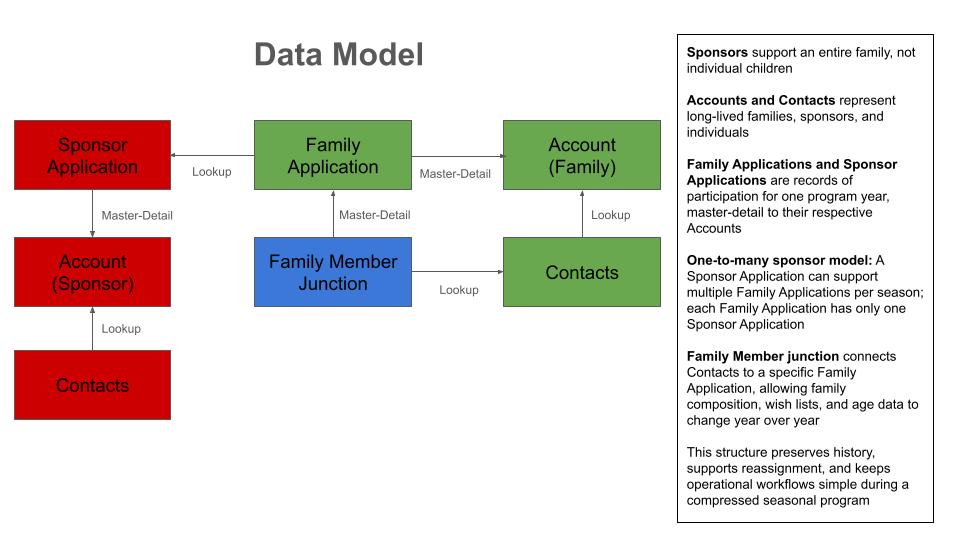
Custom Data Model
- Family Applications
- Children’s Wish Lists
- Sponsor Applications
- Junction objects to link contacts to applications
Human-Centered Automation
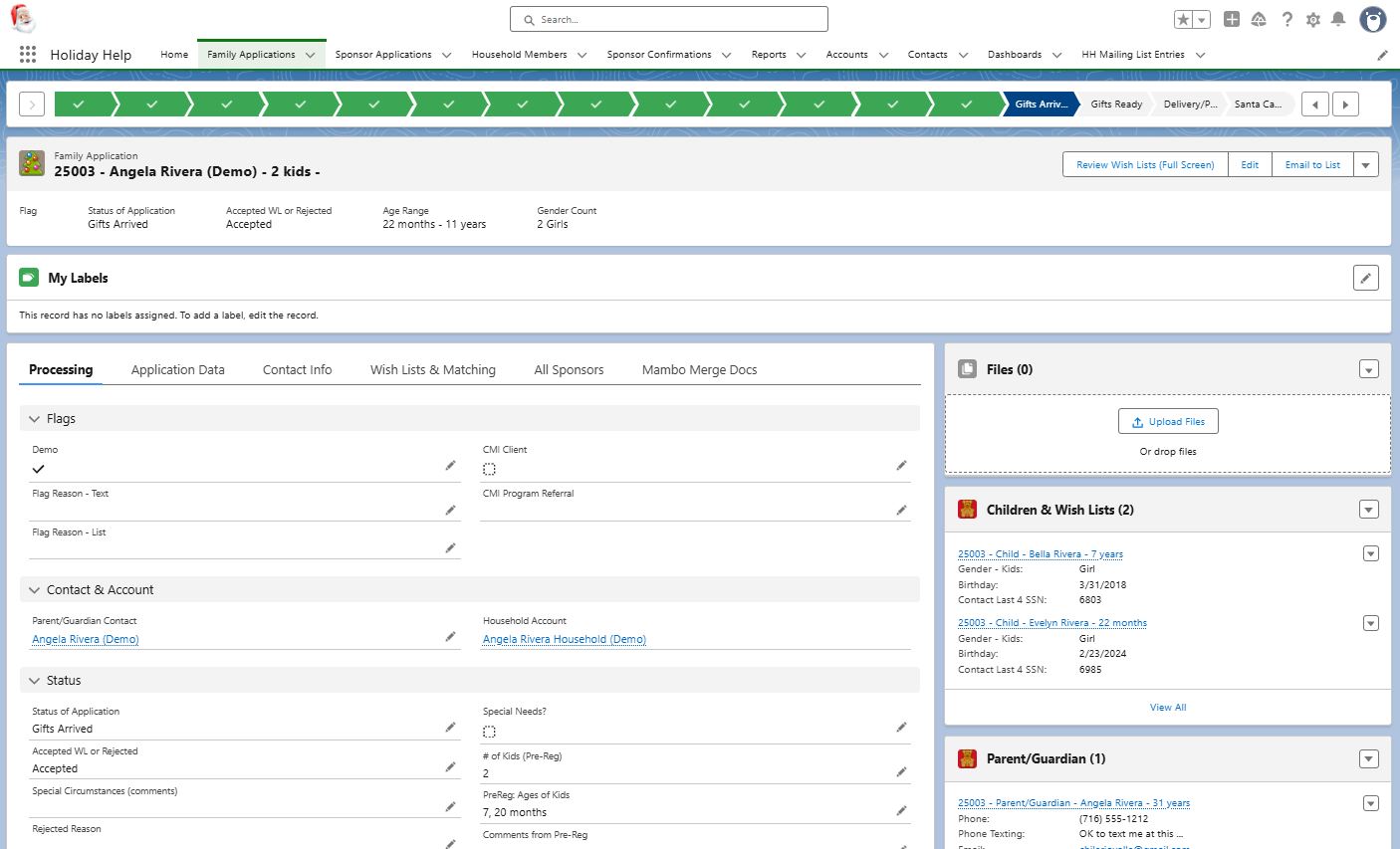
- Flows to calculate number of children, gender mix, and age range
- Formula to calculate child’s age on Christmas Day
- Auto-named records (e.g., “Smith Family – 3 Kids”)
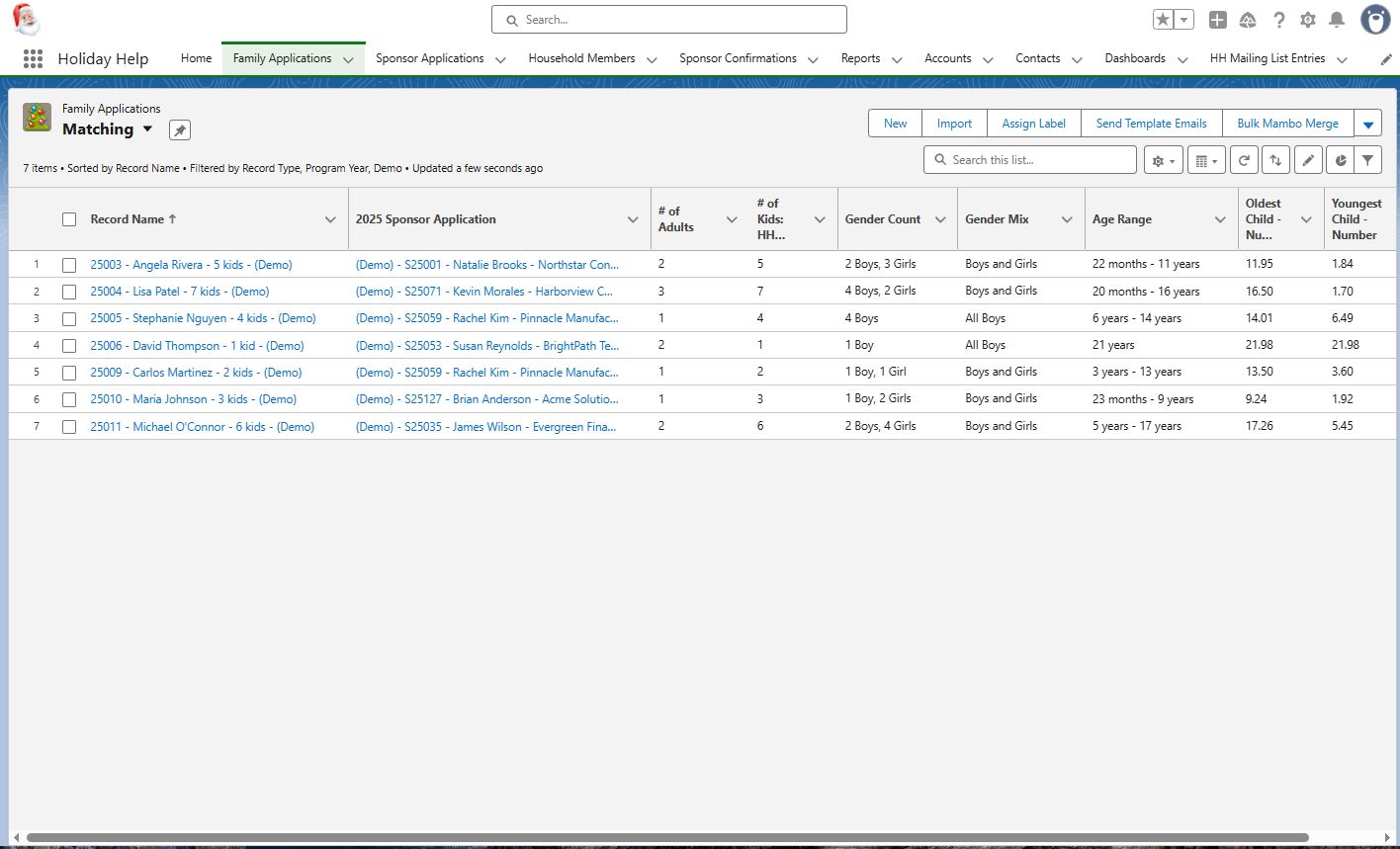
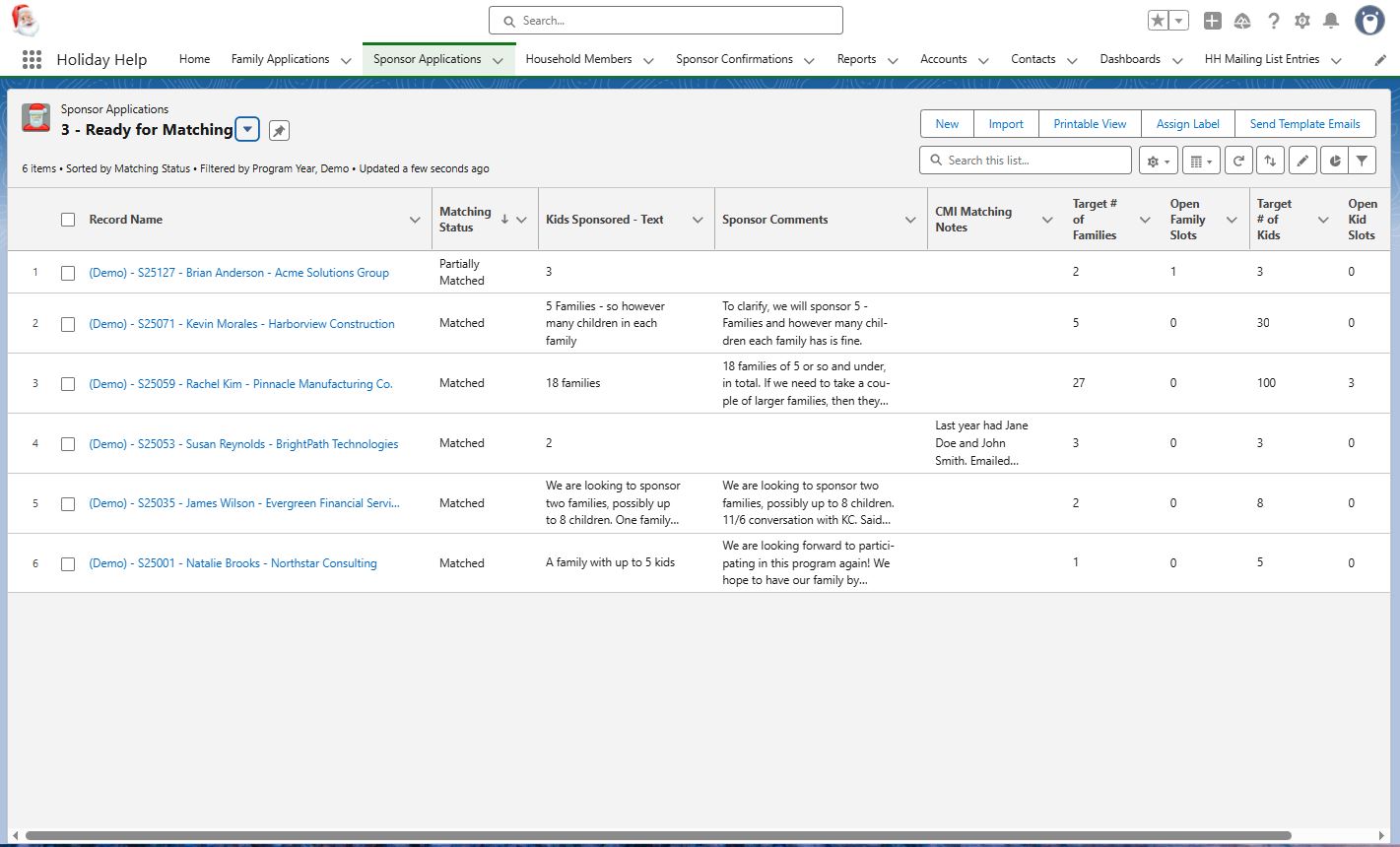
- List views to sort/filter families by sponsor preferences
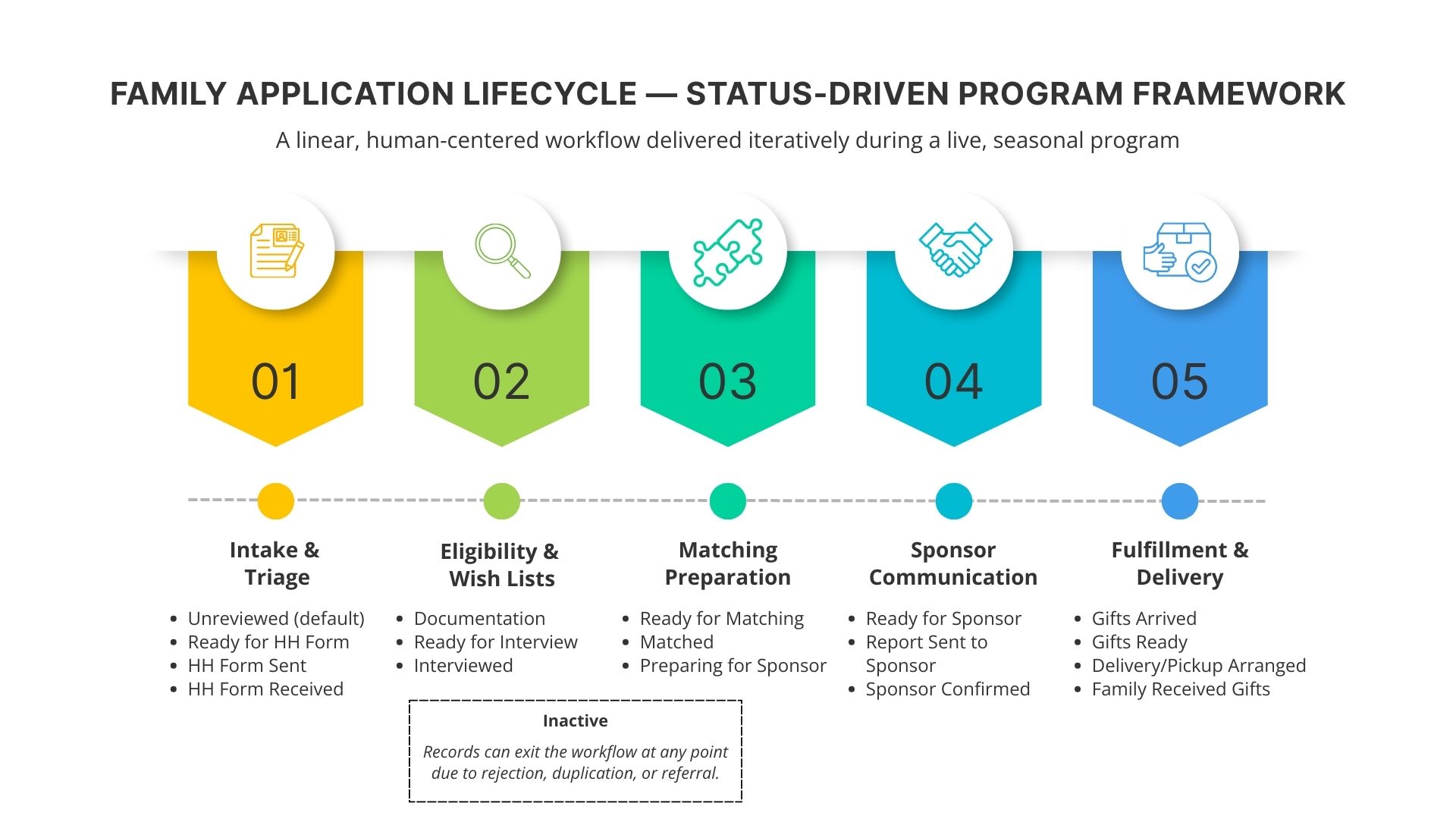
- Status-tracking Flow (Unreviewed → Matched → Delivered)
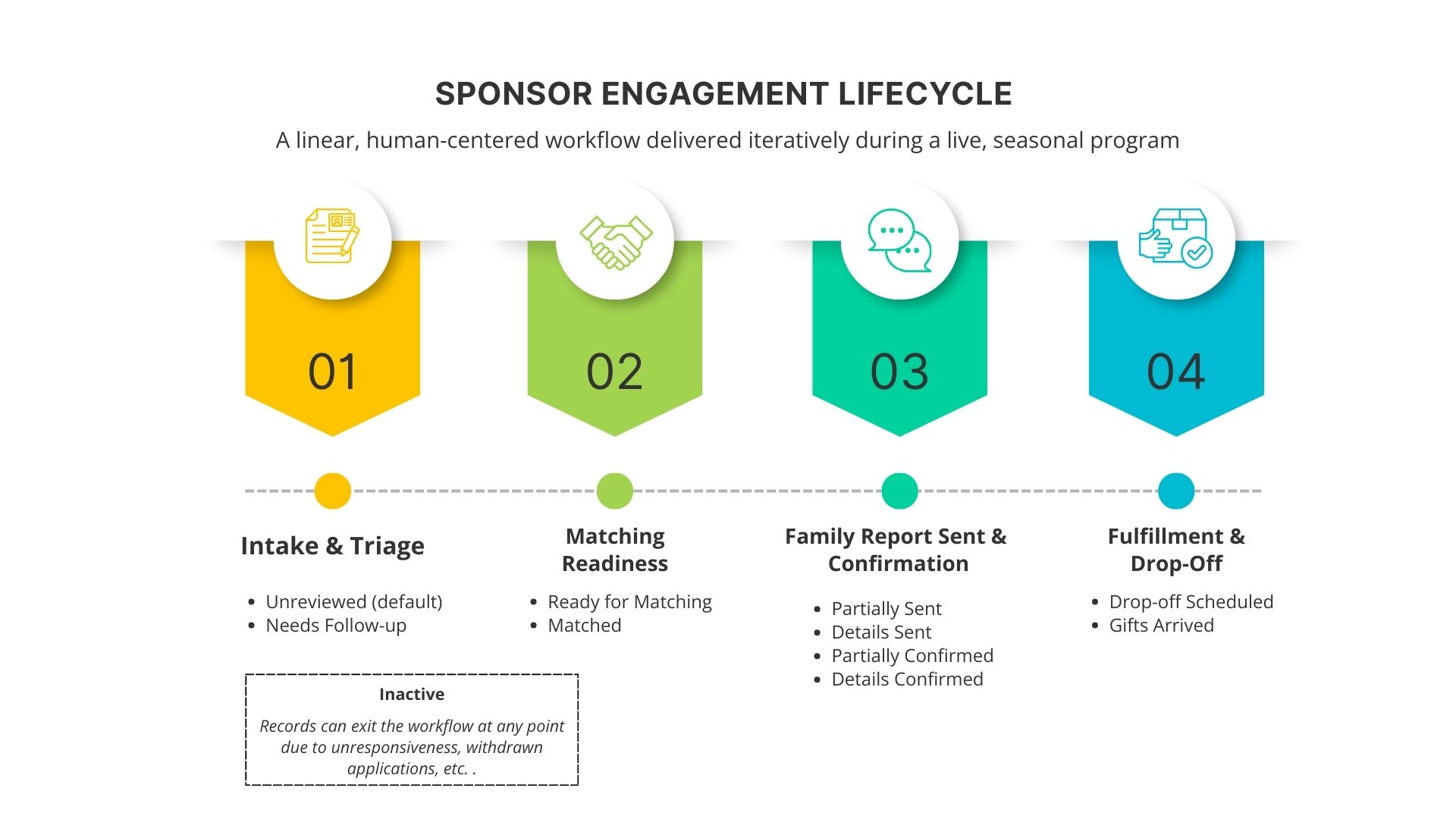
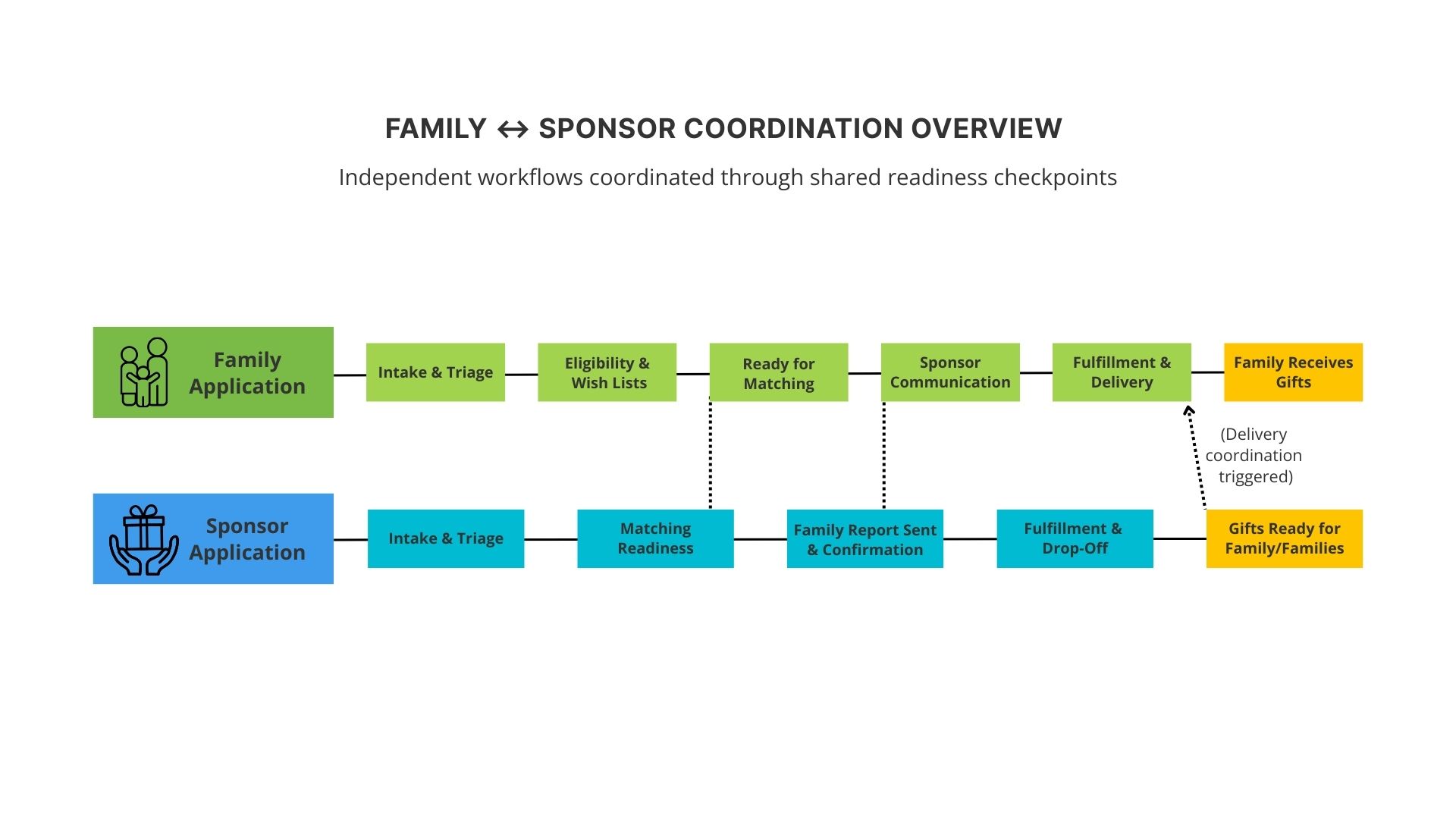
Data Model and Workflow Screenshots
Reports & Dashboards
- Sponsor reports with full family & gift details
- Delivery reports (addresses, phone numbers, child info)
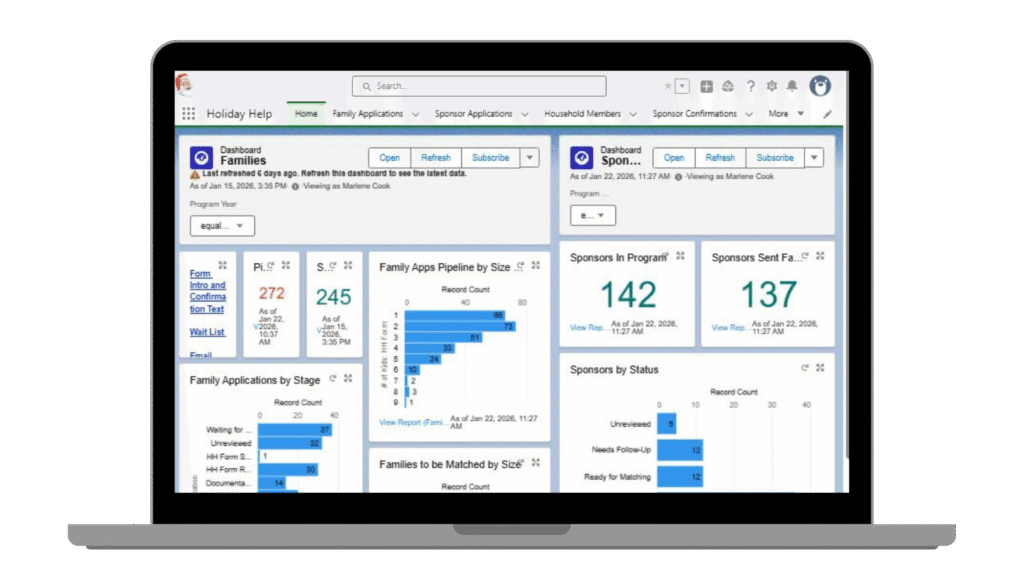
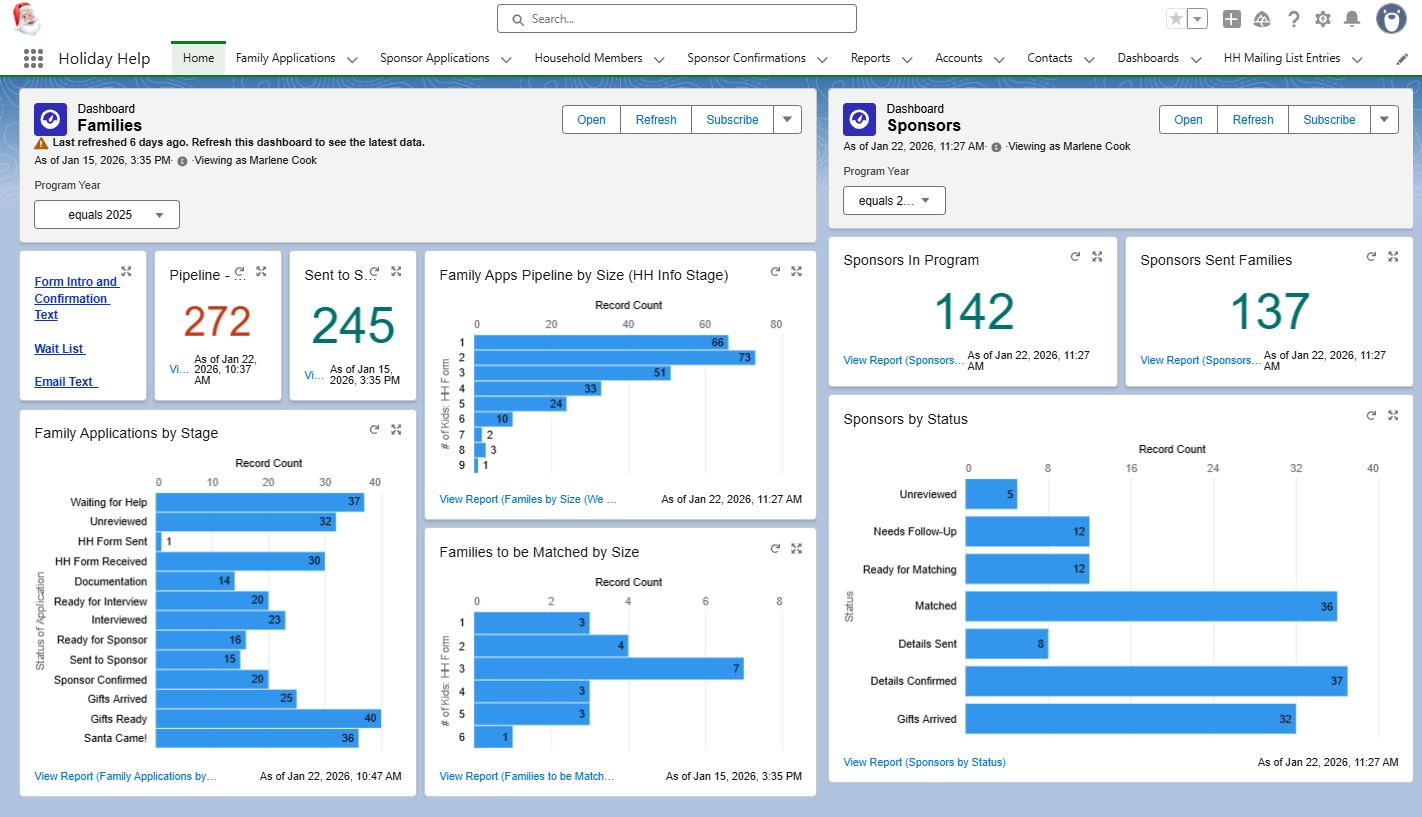
- Summary dashboards showing program status and impact
Guided Screen Flow for Volunteers
- Prompted volunteers through key questions
- Structured responses to support reporting and sponsor communication
- Ensured consistent data collection without removing human warmth
Salesforce Screenshots

Key Integrations

Jot Form
- Integrated with Salesforce via native connector
- Preserved raw data in Jotform as a backup for data edge cases

Mambo Merge
- Used to generate family and child reports for sponsors as well as delivery detail reports for drivers
- Set up to generate reports on individual records and in bulk through list views

Map Plotter
- Used to plan gift delivery routes based on family addresses
- Helped volunteers group deliveries geographically and reduce driving time
Agile-Informed Consulting Approach
The solution was delivered using an iterative, Agile-informed approach adapted to a live nonprofit program with a compressed seasonal window (September–December).
At the outset, I mapped the full linear lifecycle of the program – approximately ten stages on both the family and sponsor sides – and validated that Salesforce could support the entire process. Rather than designing every detail upfront, I implemented the system incrementally, aligning configuration with each stage of the program became active.
- In-season (stage-to-stage): Online intake forms and core workflows were delivered first, with required fields, validations, statuses, and list views refined as each stage became active.
- Continuous feedback: The two primary users participated in weekly working sessions, reviewing screens and logic as they were built and adjusting requirements based on real usage.
- Between seasons (year-to-year): Because major changes mid-season introduce risk, we captured lessons learned and treated each new season as a planned improvement cycle. More complex features—such as Experience Cloud—were intentionally deferred until justified by scale and budget.
While not formal Scrum, this approach aligned closely with Agile principles: incremental delivery, collaboration, and continuous improvement.
1. Workflow-Centered Architecture
I implemented a status-driven model where application stage was calculated from observable milestones (documentation received, interview completed, gifts delivered, etc.).
- Visual Path provided shared understanding of progress
- List Views grouped records by stage and became the primary operational tool
- Work was delegated to staff and volunteers with minimal training by assigning specific list views
This structure replaced informal paper sorting with a transparent, repeatable workflow.
2. Data Model Designed for Nonprofit Reality
- Annual application records with Accounts and Contacts preserved history, allowing for changes in household composition and sponsor affiliations year over year.
- Family Member junction: Stored year-specific child details, including wish lists and age. A custom Child’s Age-on-Christmas formula ensured both historical accuracy and sponsor clarity for gift selection.
- Sponsor–Family junction: Tracked family assignments, drop-off times, and delivery status.
3. Human-Centered Matching: Automation That Supports Judgment
Sponsor matching is an area where full automation can seem appealing, but in practice, it was not appropriate for this program. While quantitative factors such as number of children, ages, and gender mix were important, the administrator also relied heavily on personal knowledge of families and sponsors that extended beyond what any system could capture—family dynamics, prior sponsor relationships, sensitivities, and contextual nuances uncovered during interviews.
Rather than attempting to automate matching decisions, I intentionally designed Salesforce to surface the right information at the right time, enabling informed human judgment. Automation was used to summarize, organize, and make key data immediately visible—while leaving the final matching decision in human hands.
This approach preserved trust in the system and ensured that technology enhanced, rather than replaced, the relational aspects of the program.
4. Matching Intelligence & Operational UX
To support fast, confident matching decisions, I created formula fields and roll-up summaries for:
- Number of children in the family
- Gender mix (“3 boys, 2 girls”)
- Age range (“13 months to 5 years”)
- Oldest and youngest child age fields for sorting and filtering
These indicators improved daily usability while supporting human decision-making.
5. High-Impact Enhancements
- Map Plotter for delivery route planning
- Mambo Merge for generating family reports for sponsors and delivery summaries with addresses, phone numbers, and caseworker contacts
- Settings object to allow administrators to update messaging and toggle waitlist functionality without editing Screen Flows
- Automated naming conventions summarizing key information (family/sponsor number, names, company, number of children)
- Flow Fault paths that sent administrators recovery instructions using Flow Interviews and ChatGPT
Results
- ~30% increase in families and children served
- Improved sponsor experience and earlier wish-list delivery
- Reduced staff stress during peak season
- Clear delegation of work and improved delivery logistics
- Greater transparency and operational control
Lessons & Future Opportunities
- Experience Cloud is the correct long-term identity solution when budget allows
- An Agile-like iterative approach is ideal for programs with compressed seasons
- Intentional decisions about where automation adds value and where human judgment should remain central
Consulting Value Demonstrated
- Agile-informed, real-world delivery
- Nonprofit-savvy process analysis
- Human-centered Salesforce design
- Strong judgment about automation timing
- Iterative improvement under constraint
Bottom line: I help nonprofits implement Salesforce in a way that respects how their programs actually operate – delivering value quickly without destabilizing mission-critical work.